

subagents parameter. Subagents are useful for context quarantine (keeping the main agent’s context clean) and for providing specialized instructions.
Why use subagents?
Subagents solve the context bloat problem. When agents use tools with large outputs (web search, file reads, database queries), the context window fills up quickly with intermediate results. Subagents isolate this detailed work—the main agent receives only the final result, not the dozens of tool calls that produced it. When to use subagents:- ✅ Multi-step tasks that would clutter the main agent’s context
- ✅ Specialized domains that need custom instructions or tools
- ✅ Tasks requiring different model capabilities
- ✅ When you want to keep the main agent focused on high-level coordination
- ❌ Simple, single-step tasks
- ❌ When you need to maintain intermediate context
- ❌ When the overhead outweighs benefits
Configuration
subagents should be a list of dictionaries or CompiledSubAgent objects. There are two types:
SubAgent (Dictionary-based)
For most use cases, define subagents as dictionaries: Required fields:str
required
Unique identifier for the subagent.
The main agent uses this name when calling the
task() tool.
The subagent name becomes metadata for AIMessages and for streaming, which helps to differentiate between agents.str
required
Description of what this subagent does. Be specific and action-oriented. The main agent uses this to decide when to delegate.
str
required
Instructions for the subagent. Include tool usage guidance and output format requirements.
list[Callable]
required
Tools the subagent can use. Keep this minimal and include only what’s needed.
str | BaseChatModel
Override the main agent’s model. Use the format
'provider:model-name' (for example, 'openai:gpt-4.1').list[Middleware]
Additional middleware for custom behavior, logging, or rate limiting.
dict[str, bool]
Configure human-in-the-loop for specific tools. Requires a checkpointer.
list[str]
Skill source paths for the subagent’s SkillsMiddleware.
When specified, the subagent will load skills from these directories (e.g.,
["/skills/research/", "/skills/web-search/"]).
This allows subagents to have different skill sets than the main agent.
Note: Custom subagents do NOT inherit skills from the main agent by default—only the general-purpose subagent inherits the main agent’s skills.CompiledSubAgent
For complex workflows, use a pre-built LangGraph graph:str
required
Unique identifier for the subagent.
The subagent name becomes metadata for
AIMessages and for streaming, which helps to differentiate between agents.str
required
What this subagent does.
Runnable
required
A compiled LangGraph graph (must call
.compile() first).Using SubAgent
Using CompiledSubAgent
For more complex use cases, you can provide your custom subagents. You can create a custom subagent using LangChain’screate_agent or by making a custom LangGraph graph using the graph API.
If you’re creating a custom LangGraph graph, make sure that the graph has a state key called "messages":
Streaming
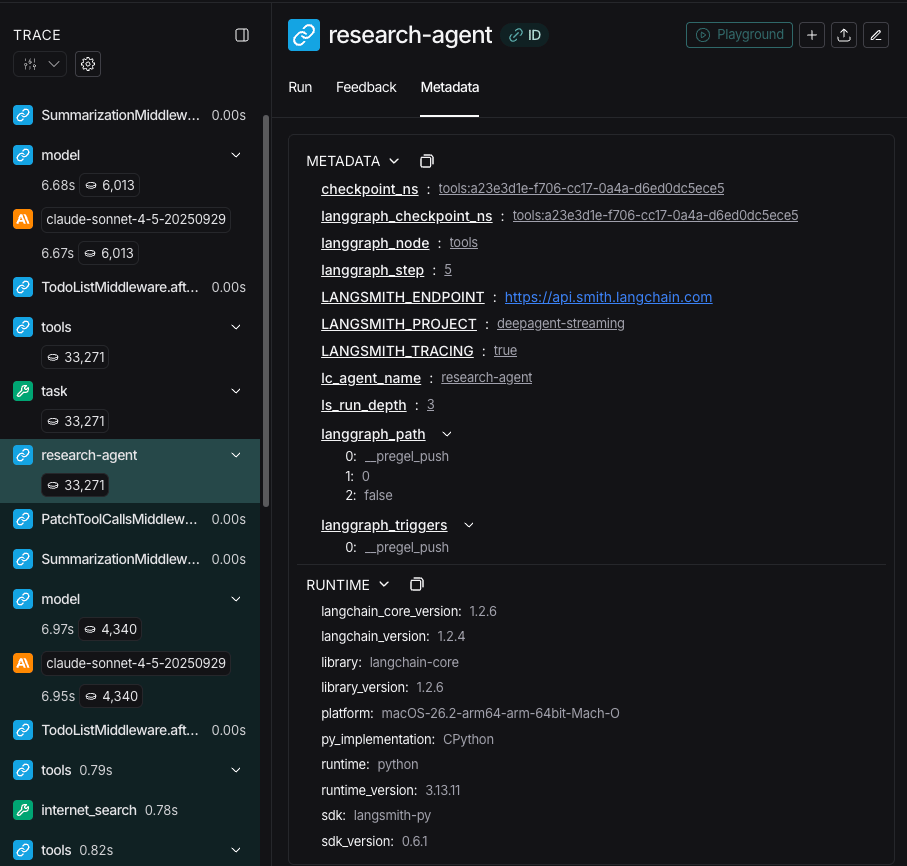
When streaming tracing information agents’ names are available aslc_agent_name in metadata.
When reviewing tracing information, you can use this metadata to differentiate which agent the data came from.
The following example creates a deep agent with the name main-agent and a subagent with the name research-agent:
"research-agent", will have {'lc_agent_name': 'research-agent'} in any associated agent run metadata:
Structured output
All subagents support structured ouput which you can use to validate the subagent’s output. You can set a desired structured output schema by passing it as theresponse_format argument to the call to create_agent().
When the model generates the structured data, it’s captured and validated.
The structured object itself is not returned to the parent agent.
When using structured output with subagents, include the structured data in the ToolMessage.
For more information, see response format.
The general-purpose subagent
In addition to any user-defined subagents, deep agents have access to ageneral-purpose subagent at all times. This subagent:
- Has the same system prompt as the main agent
- Has access to all the same tools
- Uses the same model (unless overridden)
- Inherits skills from the main agent (when skills are configured)
When to use it
The general-purpose subagent is ideal for context isolation without specialized behavior. The main agent can delegate a complex multi-step task to this subagent and get a concise result back without bloat from intermediate tool calls.Example
Instead of the main agent making 10 web searches and filling its context with results, it delegates to the general-purpose subagent:
task(name="general-purpose", task="Research quantum computing trends"). The subagent performs all the searches internally and returns only a summary.Skills inheritance
When configuring skills withcreate_deep_agent:
- General-purpose subagent: Automatically inherits skills from the main agent
- Custom subagents: Do NOT inherit skills by default—use the
skillsparameter to give them their own skills
Best practices
Write clear descriptions
The main agent uses descriptions to decide which subagent to call. Be specific: ✅ Good:"Analyzes financial data and generates investment insights with confidence scores"
❌ Bad: "Does finance stuff"
Keep system prompts detailed
Include specific guidance on how to use tools and format outputs:Minimize tool sets
Only give subagents the tools they need. This improves focus and security:Choose models by task
Different models excel at different tasks:Return concise results
Instruct subagents to return summaries, not raw data:Common patterns
Multiple specialized subagents
Create specialized subagents for different domains:- Main agent creates high-level plan
- Delegates data collection to data-collector
- Passes results to data-analyzer
- Sends insights to report-writer
- Compiles final output
Troubleshooting
Subagent not being called
Problem: Main agent tries to do work itself instead of delegating. Solutions:-
Make descriptions more specific:
-
Instruct main agent to delegate:
Context still getting bloated
Problem: Context fills up despite using subagents. Solutions:-
Instruct subagent to return concise results:
-
Use filesystem for large data: